
Olivia Wang

.png)

Commbank Super
managing super seamlessly
This Commbank Super app provides a seamless and effortless experience in checking and managing super.
Timeline:
March 2021 (17 days)
My Responsibilities:
User Research
UI Design
Team:
Amina Husic, Sabina Yu
Introduction

"Money, money, money, must be funny.
Money, money, money, always sunny."
Almost all of us want to have control of money, however, we can only view our super performance via the current Commbank app. If we want to change our super investment options, we have to open our laptops. Maybe, things can be easier?
After a series of user research, we found out that 50% of users want to be able to manage their investment options, 64.3% of users want to know where their money is invested, 71% of users want to be able to view their performance and employer contributions on the go. So, we redesigned the Commbank app with Figma which provides a seamless and effortless experience in checking and managing your super.
In the era of mobile data, people need to be able to monitor or manage Super anytime, anywhere
To find out users' needs for Super, we conducted 9 user interviews.
.png)
Do you want to manage your own super? Why or why not?
What is important for you when you look at your super?
How do you manage your super?
What are your most concerns when you invest your super?
The most common feedback is that people want to have the option to view performance and change Super options via mobile bank apps.
However, at the moment, CBA only has the option to view Super statements within the mobile app, so if users want to monitor or manager their
Super, they have to move to laptops or desktops.
.png)
Age, risk awareness and investment knowledge affect people's Super management behavior
After these user interviews, we synthesized the research result by affinity mapping.
.png)
When it comes to Super, age and risk awareness are big concerns, and they are related.

I am young and I like high risk.
I am young and I don't have so much Super. I just want to know whether my employer contributes to my Super on time.
.png)
.png)
I am quite old now and getting ready to take out my super.
I am not young now so I want to put my Super in a safer place and I want to know where my money is going.
.png)
People want to manage their Super but they lack relevant financial knowledge or information
.png)
It's too intimidating to find information.
Too many jargons, too hard to understand. I don't know what I can do.
.png)
.png)
Getting the design right
To confirm these insights from the user interviews and to find right direction for the design, we conducted 23 user surveys.
80% of users leave their super to be managed by their financial institution because they feel they lack knowledge, not because they trust their institutions.
.png)
80%
.png)
71%
71% of users want to be able to view their performance and employer contributions on the go.
.png)
64.3%
64.3% of users want to know where their money is invested.
.png)
50%
50% of users want to be able to manage their investment options.
To better understand and manage Super by yourself is not a easy task
Our research found two main types of Super users. One is the controller who wants to be more hands on his Super , and the other is the observer . To find out their pain points, I looked at their journeys on the current Commbank app.
Hard to choose better options and unable to manage Super via mobile app
Adam, the active controller, finds it hard to select better Super investment options because he is unable to see the prediction of his Super performance or other related information. Also, he wants to manage his Super via Commbank app because he feels it not very convenient that whenever he wants to manage his Super he has to leave the app and log in on the Commbank website again.


To understand Super is time-consuming
Flora, the observer, finds it hard to understand her Super through a 36-page statement. She wants to monitor her Super in a efficient way.
.png)

.png)
Competitor Analysis
We conducted competitor analysis of three companies, such as ANZ Australia and Australian Super, and view the super balance and edit super option
.png)
We can see that as a professional Super management app, the performance of Australian Super is very outstanding.
In the field of Super management, Commbank app has many opportunities to improve.

Information Architecture
To find out how we design the IA, we conducted card sorting via optimalworkshop. We borrowed some items from other competitors’ apps, and asked 6 participants to organize topics into categories that make sense to them.
Then it turned out that performance, portfolio and transaction are the most common groups.

.png)
Wireframing
We organized a design studio, and after the first sketh we made the first wireframe.
.png)
.png)
Iteration according to usability testing
According to the needs of Adam the Controller, we provided 7 users with the following tasks:
-
Review your Super performance YTD
-
Amend your Portfolio options
-
Contribute to your Super account
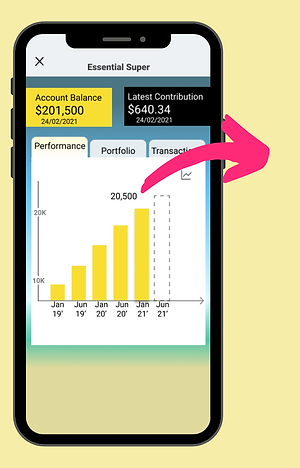
Users want to know details about their Super performance
Early Version
Final Version
.png)
"I want to check the progress overtime at different time interval"
"How much I earned?"
"Is my Super performing well?"
.png)
Users can zoom in/out to choose different time interval.
provide people with a figure on their actual net return.
Compare against the benchmark and see super performance.
Users want to know details about their Super performance
Early Version
"I don’t understand what does where and how even mean. "
.png)
"I am confused by these terms."
Final Version
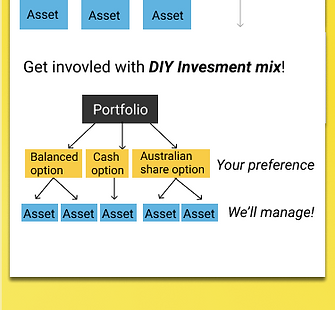
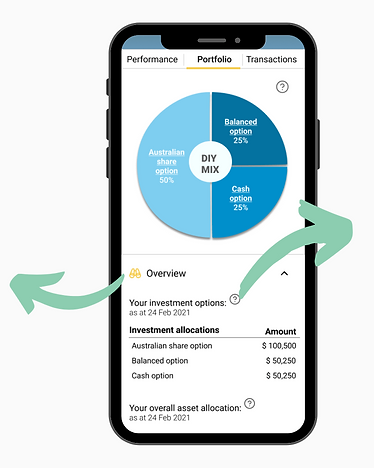
Put users' investment options and asset allocation into an overview, which is more straightforward.
.png)
.png)
Provide basic explanation on what these terms mean and the level of risk of each options and assets.
Users want to manage their Super within the app
Early Version
.png)
In the early version, change my investment options is only a link to Commbank website. people feel “I am already using the app, why I need to go out of the app to manage my super?”
Final Version
Change the link to a button and add “edit portfolio” pages to give users the ability to edit their portfolio within the app.
.png)
.png)
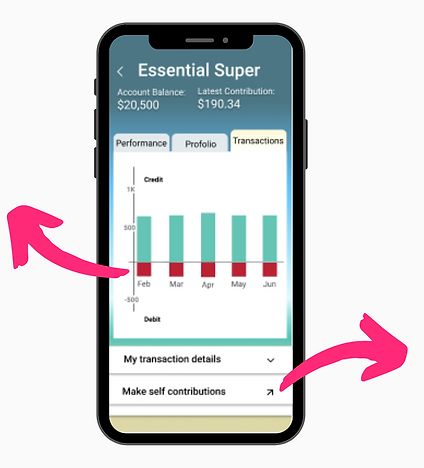
Users want to understand numbers and colours easily
Early Version
.png)
"It's red! Am I losing money?"
"It looks like a link, do I need to go out of the app to make self contribution?"
Final Version
.png)
Change the link to a button.
.png)
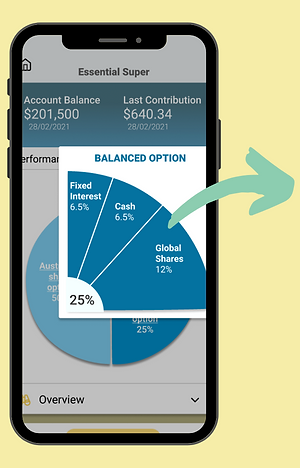
Users need a clear display of the investment portfolio
.png)
Early Version
"They are in different colours. Does this mean they are different options?"
Final Version
.png)
Change different colours into blue colour palette.
.png)
Create an option of a pop-up, which shows what is in that each particular option.
Adam's new journey
Remember Adam’s story I told you before? Now let’s see Adam’s new journey with the redesigned Commbank app.
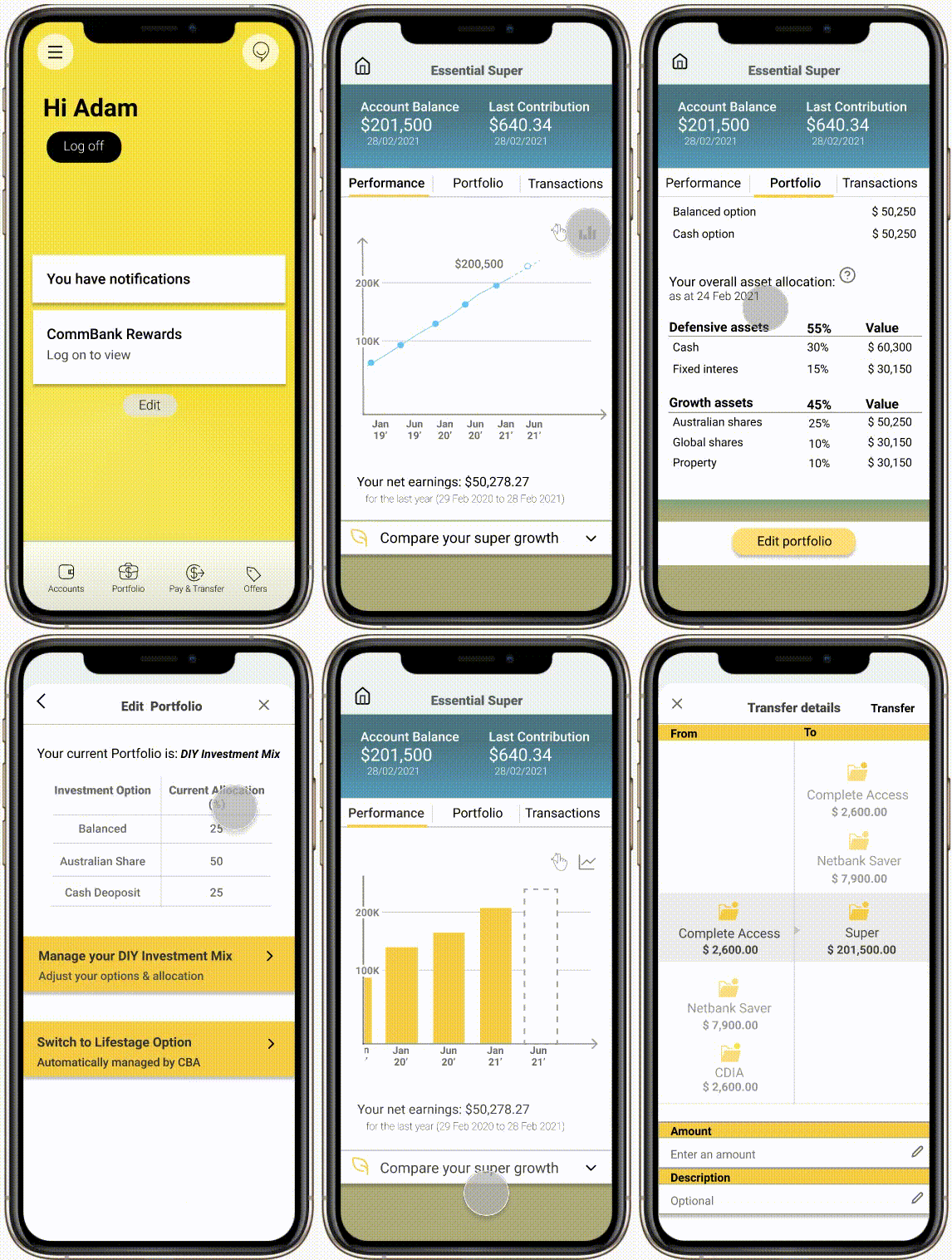
One day, the Commbank app automatically updated. That night, Adam took out his mobile phone, ready to see his super performance.
He was pleasantly surprised to find that this app changed a lot.
On the performance page, he could see his balance and last contribution at the first glance. He could even see the projection shortly.
He compared his super growth to the benchmark.
Then he wanted to know whether his employer contributed to his super on time, he clicked the transactions tab.
On this page, he could see money in, money out and transaction history. He clicked the "make a contribution" button, and chose an account and transferred some money into his super account.
Then he clicked the portfolio tab, found out that he could overview the whole portfolio and details of each option. He could get some information by clicking these questions icons, nice.
He saw the “edit portfolio” button. “Does it mean I can edit my portfolio within the app?” He wondered and clicked the “continue” button.
“Cool! I can manage my super without opening my laptop to edit my portfolio anymore, it’s convenient!” He viewed his current portfolio, then decided to change it.
He edited his options and percentage. Clicked next, shows the confirmation page, clicked confirm, “Congratulations! Your changes have been accepted and will take effect in 3 business days.”
Great! Adam likes his new journey with the redesigned commbank!
.png)
Next Steps
After two weeks of a very intense project, we completed the MVP with the above features. In the future, the following additions can be added to the Commbank:
-
show the history of portfolio change .
-
give users the ability to contact financial advisers.
-
provide investment tips/ advice.
What I learnt
Mobile-first is not only a design thought but also users' preference.
We live in the mobile data era. People get used to deal with their daily life and work via mobile phone, so if people have to leave an app to complete a task via desktops or laptops, they will feel very convenient. So, as a UX/UI designer, I should always care people's mobile needs.
People prefer to control their money by themselves.
Modern people want to be able to plan and manage their money, and they need to know their money is used on good things. So, financial apps should give users ability to monitor and manage their money.